Material View
This is part of 4D Paint.
This view works only with Standard Cinema 4D materials. It is designed to facilitate painting over multiple materials on your models for a UDIM style painting solution.
The Material View makes it simple and easy for you to add layers, channels, fill polygon, bleed out textures and more... over all the layers and channels on every material you have on the selected object.
Advanced features for texture re-mapping and extraction, bleeding and UDIM support.
Full documentation can be found here.
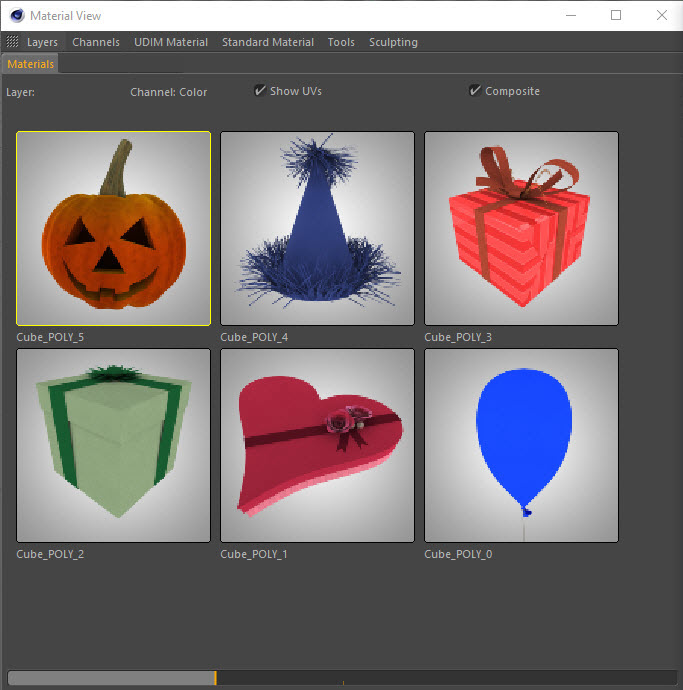
Menus
Layers
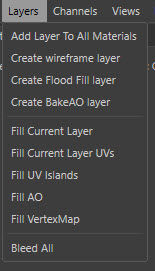
Create new layers in the currently selected channel in the Layer View.
Channels
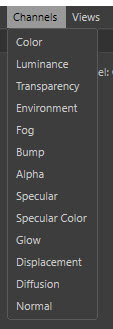
Create new channels on your materials.
Views

Available if you also have the Texture View plugin.
UDIM Material
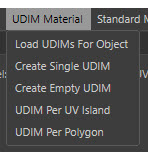
Create new materials with UDIM naming for a UDIM based workflow.
Note: Load UDIMs For Object is only available if you also have the UDIM Importer plugin.
Standard Material
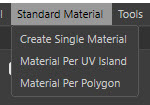
Create new materials with standard naming.
Tools

Select the edge uvs.
Sculpting
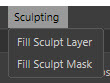
Fill the selected layer with information from selected sculpt objects layer or mask.
Right Click Menu
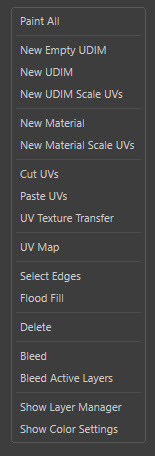
Right Click menu that will affect the currently selected material in the Material View.
Feature List
GENERAL FEATURES
- Create Layers for every Material with one click.
- Create a rendered wireframe layer for every material.
- Create a new flood filled layer for every material.
- Create a new layer and rasterize the Baked Ambient Occlusion vertex map to the layer.
- Fill the current layer on every material with color.
- Fill all the UVs on a layer on every material with color.
- Fill all the selected polygons UVs on a layer on every material with color.
- Fill all the UV Islands on every material with a random color.
- Fill the current layer by rasterizing the BakeAO vertex map to it.
- Fill the current layer by rasterizing the currently selected Vertex Map to it.
- Bleed all the layers, on every channel, on every material to remove seams.
- Add a new texture for a channel to every material.
- Activate and switch the selected channel on every material.
- Activate and switch the current layer on the current channel on every material.
MATERIAL FEATURES
- Create a new material for every UV Island and add a color channel with texture in one go.
- Create a new material for every polygon and add a color channel with texture in one go.
- Create a single material for the currently selected UVs. A selection tag is created for the selected polygons and is assigned to a new material.
- Right Click to create a single material for the currently selected UVs from the Material under the mouse cursor. Creates a selection tag and remaps the UVs to take up the space on the texture. It then will re-sample all the textures on every layer on every channel and remap the texture to the new texture maps on the new material.
UDIM FEATURES
- Create UDIM materials automatically based on the UV coordinates of each UV Island on the object. If the UVs are within a certain UVDIM they are added to a new Selection Tag that uses the UDIM naming convention, the selection tag is then used on a New Material. A color channel texture is automatically added to all the materials.
- Create a new UDIM material for every UV Island and add a color channel with texture in one go. UVs are added to a new selection tag which uses the UDIM naming convention.
- Create a new UDIM material for every polygon and add a color channel with texture in one go. UVs are added to a new selection tag which uses the UDIM naming convention.
- Create a new UDIM material for the currently selected UVs, create a selection tag and also remaps the UVs to take up the space on the texture.
- Right Click to create a new UDIM material for the currently selected UVs from the Material under the mouse cursor. Creates a selection tag and also remaps the UVs to take up the space on the texture. It will then re-sample all the textures on every layer on every channel and remap the texture to the new texture maps on the new material
OTHER FEATURES
- Select all the edge polygons of the UV Islands when in polygon mode.
- Select all the edges of the polygons of the UV Islands when in edge mode.
- Select all the points on the edges of the polygons of the UV Islands when in point mode.
- Easy Right Click Menu to enable painting on all the materials. Materials are all set to No-Scaling, the layer is selected, materials are activated for BodyPaint and all textures are loaded to allow for painting.
- Easy Right Click menu to bleed, flood fill, select edges, change channels/layers, hide/show layers, create new UDIM or Standard materials and automatically remap textures and also delete materials.
- Preference to set the default texture sizes of new textures and also a separate option for the per polygon texture creation.
- Easily scale the Material previews up and down.
- Drag and drop images from the Content View, file system, Content Browser directly onto the materials preview. The texture is sampled onto the currently selected layer and channel for that material.
- Select UVs directly in the Material View. Alt+Click to select a UV Island. Shift and Ctrl to add and remove from selections.